End-to-End Mobile App Design
I designed FurFresh's app to make booking dog grooming appointments simple and transparent.
Type
Case Study
My Role
UX/UI Designer
Duration
6 Weeks
Tools
Figma
Project Brief
Key Issues
• Complex Booking: The scheduling experience was frustrating and unintuitive.
• Limited Customization: No easy way to add specific grooming preferences.
• Unclear Pricing: Costs weren't transparent, causing frustration.
Challenges
• Building From Scratch: No existing brand, guidelines, or design system to reference.
Solutions
• Simplified Scheduling: Streamlined the booking flow into a few quick steps.
• Custom Add-Ons: Let users tailor each appointment to their pet's needs.
• Upfront Pricing: Displayed clear costs before booking is confirmed.
Research Methods
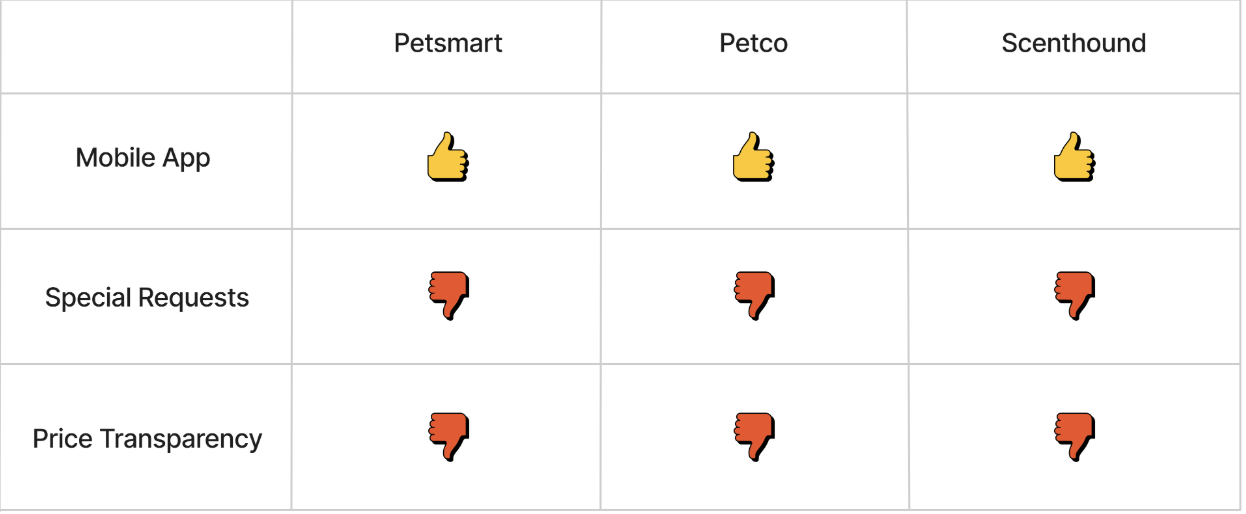
Competitor Analysis
Analyzed PetSmart, Petco, and Scenthound to identify gaps in booking and pricing transparency.
Secondary Research
• Preference for transparent pricing
• Need for appointment flexibility
• Desire for personalized services
Market Trends
Growing demand for mobile, convenient pet care solutions.
User Interviews
Method
I interviewed 5 participants to learn more about their booking habits and preferences.
Findings
• Customization: Users want the option to add special requests to their booking.
• Pricing Transparency: Users want clear pricing upfront to build trust.
Quotes
"Easy scheduling, clear services, and the option to add special requests." - Leanne
"Seeing prices upfront is important. I want to know if it fits my budget." - Tyler
Problem
Customers need a fast, transparent way to book grooming appointments, but complex scheduling and unclear pricing get in the way.
User Persona
Terry Wallace, a tech-savvy user who values a convenient app for scheduling her pet's grooming.

Click here to view the full user persona in Figma.
How Might We
• How might we simplify the booking process?
• How might we make it easy to customize each appointment?
• How might we make pricing clear from the start?
Feature Set
Easy Booking
A simple, intuitive process for scheduling grooming sessions in a few taps.
Service Customization
Add-ons and preferences to tailor each appointment to your pet's needs.
Transparent Pricing
Clear pricing shown for every service and add-on before booking.
Booking Confirmation
Instant confirmation sent via app and email.
User Flow

Guides users through service selection, customization, pricing, and booking confirmation.

Click here to view the full user flow in Figma.

Brand Guidelines
UI Kit
• Login Info Field Input
• Progress Bar
• iOS Status Bar
• Logo Bar
• Nav Bar
• Calendar Date Selection
• Back Arrow
• Add Ons
• Time Slot
• Add Pet
• Pet Selection
• Primary Button
• Secondary Button
• Service Selection Button
• Professional Selection Button

Click here to view the full UI kit in Figma.
Low-fidelity Wireframes

Designed initial screens for booking, customization, and pricing.

Click here to view the full lo-fi wireframes in Figma.

High-fidelity Wireframes
Refined colors, typography, and graphics for a polished, user-friendly design.

‍Click here to view the full hi-fi wireframes in Figma.
Prototyping
Added transitions, sticky navigation, and smooth scrolling for a more interactive experience.

Click here to view the full prototype in Figma.
Usability Testing
Method
I tested the hi-fi wireframes with 5 participants to see how easily they could complete a booking.
Findings
• Confusion with bottom navigation buttons
• Participants needed clearer labels and a progress tracker to navigate the booking flow.
Iterations
Added button labels and a progress tracker to improve navigation.
Click here to view the full final design in Figma.
Reflection
Every screen matters because even one frustrating interaction can cause a user to abandon the booking flow.
Next Steps
Test the full flow with more users to catch friction points before they cause drop-off.
Homepage >